Posts

Showing posts with the label Arduino 101

Arduino 101: Programming with Visual Studio 2015 Community Update 2

Image
 How can I program Arduino 101 board using Visual Studio? It is not very difficult. You need to use the right tools. If you rather not use Visual Studio 2015, you could also use the program from Arduino . But Visual studio does lot more than Arduino Program. Follow these steps. Step 1: First thing you need to have is the correct version (if you follow my advice) of Visual Studio. Get the Visual Studio 2015 Community (What I have is the same but with Update 2). If you do not have, no problem. Read this post . Step 2: For Arduino to work with Visual Studio 2015 Community (VS2015C), you need to install the Arduino Extensions for Visual Studio. A default install of VS2015C does not have the 'hooks' to create a Arduino Project. You will not find it in the ' New Project... ' templates. You need to install the Arduino Extension for Visual Studio 2015. You can get an idea how to do it by following this Swaytorial : Step 0: Of course you need to buy t...
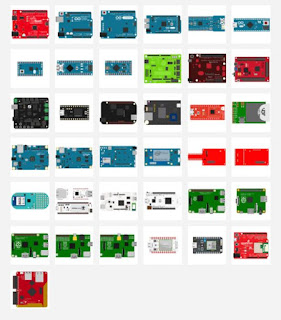
Multiboard programming using Johnny-Five robotics and IOT Platform

Image
Arduino boards can be programmed using Arduino software (or in Visual Studio Community using Arduino Extensions) and Intel IOT boards can be programmed using Intel XDK IOT . Using JavaScript to program controllers would be very useful as most browsers are HTML5 compliant. The Johnny-Five Robotics and IOT program is an interesting option. Johnny-Five is the JavaScript Robotics and; IOT platform released by the Bocoup group. Johnny-Five is maintained by a growing number of talented developers. What is Bocoup? Bocoup  is a group that championed the cause of Open tools and WorkFlow. They really seems to have people with very varied and diverse talents to tackle web, data, and visualization. How does Johnny-Five handle the Hello World (or Blink for that matter)? It looks like 1-2-3 really. 1. Install Node.js(Preffeer 4.2.1 LTS) 2. Setup your board 3. Run: npm install johnny-five What else is needed? You also need to run the Firmata protocol for the c...

Arduino 101 : Implementing the basics

Arduino 101 is an electronics board that makes it easy to test out some simple IOT examples. It is not quite ready for IOT but you can do some Bluetooth tests with it. It also has built-in 6-axis accelerometer and gyroscope.  It has 14 digital input/output pins (of which 4 can be used as PWM outputs); 6 analog inputs; an USB connector for serial communication and sketch upload, a power jack, an ICSP header with SPI signals and I2C dedicated pins. These peripherals are the same ones you find on Arduino UNO.  Optionally, the USB connector also supplies power to the board. This post shows how to work with Arduino 101 using the Arduino 1.8.3 program. You can test using the Blink program; a program that you upload to the board that makes an LED to blink. Review this Swaytorial on the docs.com site .