Posts

Showing posts with the label CSS

Nice editor to have on your phone

Image
If you want to run any of HTML,CSS and JavaScript this program is the one you should have. jsFiddle is a nice editor for running your web page and checking out each of: HTML fragment; CSS rule or the Script. More details with examples are here: http://hodentekhelp.blogspot.com/2016/09/what-is-jsfiddle.html You can access this site jsFiddle.net to bring up the online editor on your phone as shown. This one is on a Micrsoft Lumia 950. Here is the ‏editor when accessed with my phone. The next one is the same as above but enlarged with inkscape. I just entered some simple HTML fragment in the top left pane marked as HTML. Then I hit the Run button at the top and I immediately I see the response in the fourth quadrant marked as Result . The first quadrant for CSS Rules; the second for HTML and the third for JavaScript. You can enter the various parts and hit the run button to see the result in the last quadrant.

Exploring styling with Intel XDK - 2

Image
In this post we take a look at media queries and how they enter styling in Intel XDK projects. Media queries came about in CSS3. In CSS2, the @media rule was introduced to address the different media types (desktop screens, printers, handheld etc). However this did not taek off except fro prit media type. Media queries look for the type of support or capability available on the device to tailor the styling. Media queries checks many things including display related variables like, Width and height of viewport Width and height of device Device Orientation (Landscape/portrait) Resolution Like anything else browser support is essential, typically the support for @media rule. Media query has the @media rule and the query syntax. The syntax of media query is: @media not|only mediatype and (expressions) {     CSS-Code; } The result of the media query returns true if, The media type matches the type of device the document is beign displayed All ...

Exploring styling with Intel XDK - 1

Image
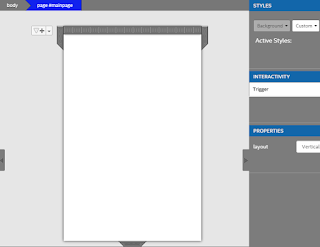
Without styling most of web pages will be drab. CSS is at the center of all web styling and Intel XDK is no exception. In a Standard HTML project with App Framework 3 in Intel XDK there is the standard .css page that governs the styling. In the case of a blank project the only reference to styling is the style sheet reference to css/app.css. In addition to touch action, zooming and other interactive elements has only the minimal styling information for the single HTML page, the styling for the body. body {background:white; color:black} The single page is shown here.   StdMain_01 When you click on Background, you get a drop-down to create a New... style for the background element. When you choose New..., you get a window where you can create a new style class as shown. A name Paleblue was provided by the user here. StdMain_02 When you click OK, the following takes place. An Index_main.less.css gets added as well as in the design area, a style designer opens up as shown. ...

Bestow native capability to Web Apps with Cardova

Image
Web apps are apps built using HTML5, CSS and JavaScript. This is no different than building a web site with HTML and JavaScript. Your web app is just the web view that will render the HTML/CSS/JavaScript files. Unfortunately this by itself is not enough except for some simple applications. However if you need access to native hardware like camera, accelerometer etc then Cardova plugins can provide access to those native capabilities. Cardova plugins consist of a JavaScript file and a code files for a given platform. Cardova maps the native code to JavaScript specific for the platform (iOS, Android, Windows) to care of implementing the native devices. Here is a list of many Cardova Plugins.

User Interface templates in Intel XDK

Image
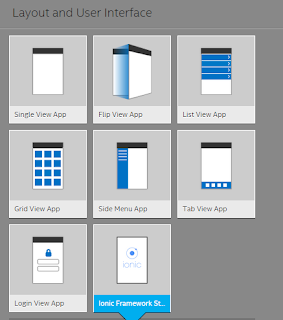
Using templates is the easiest to start off designing apps with Intel XDK. Intel XDK provides a number of layouts and templates for designing apps.  Layout_UI.png If you have been using apps you must have come across apps that use many of these types of apps. For example an earlier post here discusses the List View Template in detail and this link describes the Tab View in detail(). We will explore the other templates in future posts.  The Ionic Framework Starter template uses the Ionic Frame work and AngularJS and you can design apps for desktop, smartphones and tablets using Standard HTML5. Ionic Framework is supposed to provide native-app like feeling for UI and is based on HTML5 and essentially a front end beautifier. However Ionic requires AngularJS which is required for UI interaction; gestures; animations etc.  ionicFramework.png In a future post  we will describe creating an app with Ionic Framework. Read more here for Ionic Framework: ionicframewo...