Posts

Showing posts with the label Universal Windows Platform

UWP: You can find the type of device you are deploying your UWP Project

Image
You can find this information using the Windows.System as shown here: Device_000 We can find the device to which the UWP is deployed using the above information. Here is a Blank UWP Project's MainPage.xaml. Device_0 I have a button and a text box. Button's click event finds the device information and writes to the text box using the click event shown here: Device_00 When deployed to the machine (Windows 10 Pro Desktop), the response is as shown. Device4.jpg When deployed to an emulator: The display shows the device info: You can get the DeviceFamilyVersion as well. The code is inside the image. On the emulator this is displayed.

UWP: Need to reduce the space between Pivot and PivotItem Header. Is there a way out?

Image
Real estate control is a common theme especially when it comes to devices such as smartphones with smaller display area. In my previous post , I did not take any particular care to adjust the space between Pivot and PivotItem Header. The display appears as shown. PivotSpace_0 I start with a Blank UWP app and add a Pivot Control as described (for example) here . Most of my posts start with a Blank Project. Now the displayed page appears as shown. In order to control the space (reduce it, essentially) you need to add a Page resource, the resource PivotHeaderItemMargin and reference it in your declration for the Pivot Items. Here is the resource I added for the page to control. PivotSpace_1 Now you need to declare the Margin for the two pivot items(on my page) as shown. Using appropriate value for 'Margin', you can control the space. Here are displays for various Margin settings. For the last item in red, a Margin was also added to the Pivot.  ...

XAML ListView Control for Universal Windows Apps

Image
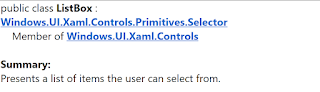
I have posted a number of articles related to ListBlock , ListView etc that you can use in HTML 5, web applications using Intel's XDK. Intel XDK's development platform for several frameworks were discontinued and Intel's effort is in the realm of Internet of Things devices and related applications. Microsoft's Universal Windows Framework apps are well supported by Microsoft and you could use it for not only Windows but for other devices as well. In the Universal Windows Platform (UWP) projects there is an advantage of one code that works on different device families (phone, tablet, desktop etc.). However, the UWP projects depend on using XAML. For example the 'List' related controls in UWP are as shown here: In this post, I will show you how you may work with this controls for a UWP project. Getting the ListView Control Placing ListView on the Design area Adding Textbox Controls to ListView Making changes to XAML Code We start with a W...

Developing Universal Windows Platform on Windows 10 devices -1

Image
You must be in Developer Mode both on the PC on which you develop Universal Windows Apps as well as any device on which you want to test your app. In this post I discuss the Settings in your PC. If your in Developer Mode on your PC then you can open a Universal Windows Platform (UWP) project in Visual Studio. Developer Mode on the PC: For example I am in Developer Mode on this computer on which I intend to develop a UWP App. When I open up Settings as shown I can search the item for 'For developers'. UWP_00 Clicking on 'For Developers the following is displayed, where if are not already in Developer Mode choose the option. UWP_01 As you develop you may want to test on a connected device which may be on the local area network or a USB connected device and you should enable them on this page. UWP_02 You should also enable the Windows Explorer settings to make your work more efficient. UWP_03 Also settup the Remote Desktop settings and some ...

This is the core of the future of 'Windows', the Universal Windows Platform

Image
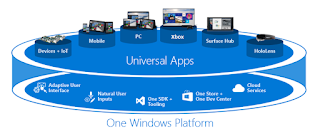
Windows evolved from just windows to include 'phones'. When Windows 8.1 was introduced Windows Runtime(WinRT) which was evolution of Windows app model came up with the Universal Windows 8 apps for both Windows and Windows Phone. Windows and Windows Phone shared a ccommon piece of code. Universal Windows Platform was introduced beginning Windows 10. The target was no more the Windows OS or Windows Phone OS but a common platform with a unified core. This core runs on all devices in the Windows family. Devices running this core can target can not only call WinRT APIs that are common to all devices but also Win32 and .NET APIs that are specific to device family. This means all you need to develop is a single app package that can be installed on a wide variety of devices shown here. UWP_00.PNG On any device, you have therefore, the guaranteed core and you add APIs on top of it specific to the device. You will conditionally access the device specific featur...