Posts

Showing posts with the label Chrome

Android Mobile Simulator for Microsoft Edge
Image
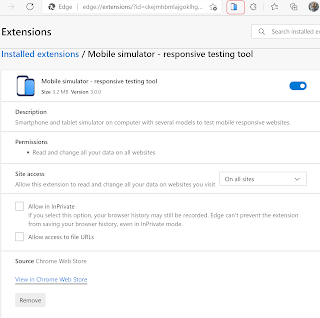
  You have built a web application on your PC or laptop.  Now,  you want to see how it appears on a mobile device. This is the use case for a mobile simulator, an extension that displays how your site would appear on a handheld. It is a responsive testing tool. It is available on Google Chrome Webstore. It can simulate 5 models of Android smartphones and 11 models of Apple smartphones. Deatils here:  Mobile Simulator From the above site you can add it to Microsoft Edge where it will show as one of the extensions as shown. How do you test it? Just bring up a web page (any) as shown here: Now click on this icon and see the simulator getting displayed as shown: There is another web site here with some operational buttons on the right.

What do you need for developing Android apps on Windows?

Image
First of all you need Android Studio and for Windows you can download Android Studio 3.0 here. Of course you need to accept the license terms. https://developer.android.com/studio/index.html Once you download the file you will be taken to the installing directions page here. https://developer.android.com/studio/install.html Review this page's image here: Run the downloaded executable and follow the wizard.

WebRTC and Microsoft Edge

Image
 WebRTC makes web pages to see and hear through the camera, microphone, speaker etc available to the device displaying the web pages. With this two people can communicate with visual and audio support and even share data. WebRTC stands for Web-based Real-Time Communications. It is free and the WebRTC project provides mobile applications and browsers to have communication capabilities using simple Application Programming Interfaces (APIs).  Since voice and video are involved it is complicated because of various standards it has to contend with. WebRTC is supported on most browsers except Microsoft Edge. Microsoft Edge is the preferred browser for Windows 10 (all device types).  Microsoft is not in the list having differences over some of the details such as Google's VP8 video codec to become the default. Microsoft has its own web based communication which is called CU-RTC-WEB. Microsoft acquired Skype which has browser-based version of voice and v...

What browser is on your phone?

Image
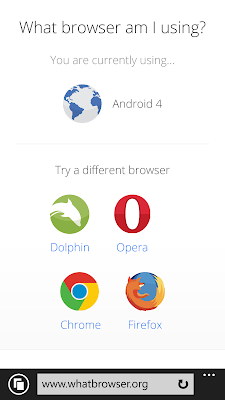
You don't like your smart phone browser. Find it and change it (you can change it for only iPhone and perhaps Androids). Open your browser and type-in the following: http://www.whatbrowser.org and you will get your answer as I got on mine (Android) Windows Phone 8.1 (I have to double check if this is true). Looks like this is not correct and find the correct answer at the end of this post. You can of course change it. Unfortunately none of these can be chosen as they appear to be not available for Windows Phone from windows store. Here is the correct and complete answer: Go to WhatIsMyBrowser.com on Windows Phone.