Intel XDK: Controls 6: Using the Google Map Widget
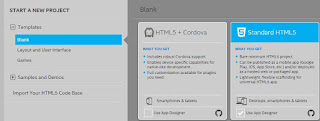
In this post, I consider configuring the Google Maps widget in the Intel XDK. Start a new blank, Standard HTML5 project in Intel XDK (version 3400 used in this post). Enable the Use App Designer checkbox. GMaps_00 Click Continue at the bottom of the above page (image is clipped). In the pop-up window provide a name for the project, GMaps in this case. Downloading and creating window is displayed. For the next screen that shows after, click No Thanks unless you want a quick tour. The Select a Framework screen is displayed with App Framework v3. GMaps_01 Click Select (top right). You have the Mainpage displayed as in my other posts. I have just added a HEADER control and named it ' Google Map ' as shown. GMaps_02 Google Maps widget is in the 'other' category under controls as shown. GMaps_03 Click on Google Maps, hold, drag and drop it on the page as shown. Just before you drop you should see the dropped area go orange in color. ...