Posts

Showing posts with the label Cross-Platform

You need KIVY to develop multi-touch mobile applications. Do you know how to install this made for mobile library?

Image
    There are many platforms for writing Apps for mobile phones and KIVY is a open-source Python library. It can be used for developing multitouch apps on mobile devices. It's strength is once created it can run on various platforms including Windows, macOS, Linux, Android and iOS.  Key Features of Kivy: Cross-Platform: Kivy allows you to write your code once and run it on multiple platforms without modification. This is incredibly useful for developers who want to reach a broad audience. Multitouch Support: Kivy is designed with multitouch in mind, making it ideal for applications that require touch input, such as mobile apps and interactive kiosks. Customizable Widgets: Kivy provides a wide range of customizable widgets, allowing developers to create unique and visually appealing user interfaces. Note: It has no Radio Button. GPU Acceleration: Kivy uses OpenGL to provide GPU-accelerated graphics, ensuring smooth and responsive user interfaces. Community and Documentatio...
Things to pick up at VSLive! 2015 in Brooklyn, NY

Everybody has a phone and a majority have smart phones of one kind or another. There are all kinds of apps and quite a lot of them you can use to do business. The basic app kinds are either native client apps or mobile web sites. Some of them use  cloud-based data and services while others may not. This session is about mobile client options; about native and web-based; about HTML5/CSS and proprietary software but mos tof all its about mobile clients. The Mobile Client track ( https://vslive.com/Events/New-York-2015/Tracks/Mobile-Client.aspx ) at the event includes the following: Using Xamarin tools to leverage your C# code on iOS and Android Azure Mobile Services Building Cross-Platform Games with MonoGame Swift for .NET Developers M02  Workshop: Native Mobile App Development for iOS, Android and Windows Using C# Monday   September   28    9:00am - 6:00pm •How to build your first mobile apps on the different platforms with the ...

SQLite is widely used in Mobile devices

SQlite is a serverless SQL Database that does not require a separate server process. You do not need a configuration (Zero configuration) and it does not need any administration. The whole database is stored in a single cross-platorm disk (or on your mobile device). It is very popular and widely used with mobile applications as the database is stored in the device and can be used without network connection. No external dependencies. SQLite as opposed to client/server relational database engines is serverless and it's use is indicated where efficency, reliability, independence and simplicity are required and it does not look for a shared repository. SQLite trasactions are fully ACID-compliant. SQLite supports most query languages that are SQL92 compliant and it is written in ANSI-C which provides simple APIs. SQLite is available on Linux, Mac OS-x, Android, iOS and Windows 32, WinCE and WinRT platforms. SQLite download from here: http://sqlite.org/download.html Read more her...

Selecting in a List using WinJS 4.0 Preview

Image
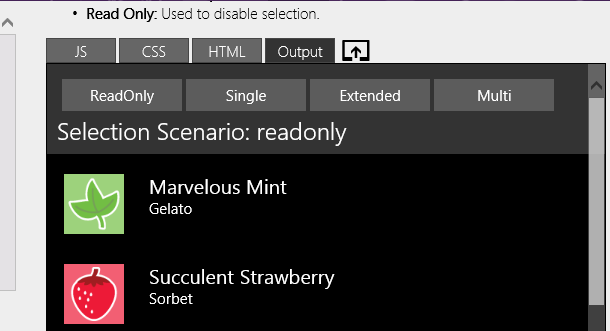
List is a great way to show all the items you have and often you want to give the user the opportunity to Select one, multiple items using mouse/keyboard or touch on Windows 8.1 OS, or providing a control to place check marks for selection. Here is a selection of code from WinJS namespace: WinJS.Namespace.define("Sample.ListView", {     modes: {         readonly: {             name: 'readonly',             selectionMode: WinJS.UI.SelectionMode.none,             tapBehavior: WinJS.UI.TapBehavior.none         },         single: {             name: 'single',             selectionMode: WinJS.UI.Sele...

AppMethod - One-stop mulitdevice app development platform

Image
IoT has to be 'Universal'. Therefore, it has to be multi-platform, multi-device, device-size agnostic and more. This is why you hear more and more 'cross-platform' development. This app works on iPhone but not on Android etc. will not do. AppMethod is one such program from the veteran, Embarcadero. Sign up here to get software that you can use to build apps in record short time. http://www.appmethod.com/sign-up?cid=701G0000000vHaD   Registration is needed, but easy with few elements. Note that the downlaoded program (file size: 3GB) is free for only one year. Read the information on the download page above. See overview here taken from a video on the site Features overview One-stop mulitdevice app development platform Supports Internet of Things FireUI Multi-device designer Enterprisemobility Devices with FireDAC support

Creating cross-platform apps with a tab view template - Part 1

Image
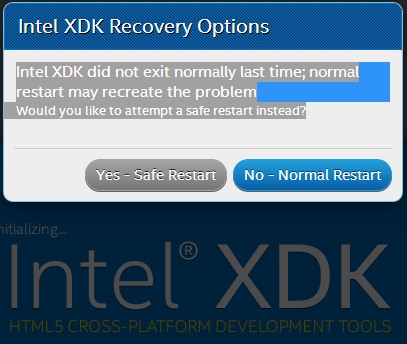
If you have not reviewed my previous posts please do so now. Cross-Platform Project apps that you can choose for designing apps here: http://hodentekmobile.blogspot.com/2014/08/creating-projects-with-intel-xdk-part-2.html Step-by-step procedure to create a ListView app here: http://hodentekmobile.blogspot.com/2014/09/creating-projects-with-intel-xdk.html There are some slight changes in this version and I recommend you download the latest. Here in Part 1, I will cover using the tab view template in Intel XDK for cross-platform and in Part 2, I will cover modifying the template and deploying it to your device. If you do not have the latest Intel XDK you can get it from here: http://hodentekmobile.blogspot.com/2014/11/get-latest-intel-xdk-and-jump-start-app.html Download the above and double click to install. Launch the Intel XDK application from its shortcut. You may get a warning as shown. Click Yes - Safe Restart This happens if you did not exit the applicat...

Get the latest Intel XDK and jump start app development

Image
Intel XDK is continuously evolving. The version number now is (November 4) v1536 and you can download from here for the major mobile platforms: https://software.intel.com/en-us/html5/tools Also download product briefing here: https://software.intel.com/sites/default/files/Intel_XDK_ProductBrief_9_14.pdf The key benefits from the pdf are listed here: Easy-to-use streamlined intuitive workflow from idea, design, debug, build and deploy Develop efficiently: Integrated design, test, and build tools for many devices Deploy simply: Across more app stores, and form factor devices The new features in this release: Apache Cordova CLI and Plugin version is updated to 3.5 Intel App Preview Updates App Designer Updates- App Starter deprecated Code editor and Web Services updated Google Play games services add to featured Cardova plugins list Build system has been updated Also serveral issues in the previous version have been addressed   Read more here: https://...