Posts

Showing posts with the label HTML 5

Visual Studio 2015 for Mobile applications

Image
Visual Studio is a great piece of software. It's higher end versions are quite expensive but Microsoft has a lower end free version, Microsoft Visual Studio 2015 Community which is free. It is well suited for mobile applications on tablets and smart phones. Do not think for a moment this is just for Windows Phone, you can develop cross-platform apps with it. If you want a app with a database backend, you have two options, SQLite and Indexed DB, one in relational and the other is non-relational. It is very easy to have SQLite on Visual Studio 2015 Community. SQLite is also free. In order to work with this post or other Visual Studio related posts you look no further than my blogs. SQLite is a relational database well suited for mobile applications. SQLite was described in a previous post here. As the Internet of Things is the trending area on the Internet, SQLite with its no administration feature is well suited. It is also the relational database for smart devices, cell p...
Develop a Side Menu App using Intel XDK - Part 8

Image
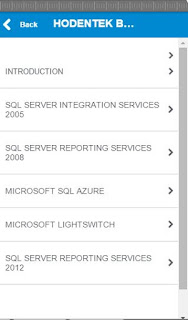
You have developed an APP such as the Side Menu App and now you want to see how it would look when you bring it up on a smart phone. It is true that it is not complete, as yet. But it is always of interest to know how it would look on  a real phone, an Apple phone or some other phone. In the previous post you have seen how you may use the emulators to view the app you designed is rendered. In this post you will learn how you may view it on a handheld device be it an iPhone or something other like a Windows 10 Mobile. This step is needed before you package it to be downloaded by anyone from one of the device stores (Google Play, Apple Store or Windows Store) I assume you have one of these devices at hand, an iPhone or some other compatible with Intel XDK. You will also require Internet Connection via Wi-Fi. The first thing for you to do is to install the Intel XDK Preview app on your device. This app is available on both Apple Store and Windows Store. If it is an Android, i...

Develop a Side Menu App using Intel XDK - Part 7

Image
You have developed an APP such as the Side Menu App and now you want to see how it would look when you bring it up on a smart phone. It is true that this app is not complete, as yet. But it is always of interest to know how it would look on  a real phone, an Apple phone or some other phone. The first thing for you to see is how it would look on the emulator. This post is to describe how it would look on an emulator. Let us say, I have finished designing an app, herein Hodentek Books which appear as shown in DEVELOP | DESIGN . appDisplay_00 Using the Emulator: I am now in the DEVELOP appDisplay_01 Now I change over to EMULATE tab as shown: appDisplay_02 The DEVICES panel gets displayed and shows the emulator for the phone type, in this case Apple iPhone 6 . appDisplay_03 The app you designed now appear in the center of IDE as shown. appDisplay_04 From the drop-down handle on DEVICES you can access many different emulators ( Intel XDK Versio...