Posts

Showing posts with the label Windows 7

Features in Windows 10 OS you would love

Image
Continuum -seamless switching to desired device type from PC to tablet, touchscreen, mouse or keyboard OK. To go from one to the other release the keyboard and you have a tablet. Cortana comes to PC beefed up and beaming. Use search bar to call her. You can ask her to do most things like play music, answer questions, send emails; launch apps, open files etc. Project Spartan browser is a browser made for windows 10 using a brand new engine, very fast, with built-in annotations that you can implement right on the web page; better reading with reading mode, auto saving for off line use, also Cortana integrated. Built-in PDF Viewer included. Office suite rebuilt for Windows 10 with new mail client. Office apps work across device types from phone to PC. Photos: auto-saving, grouping; collection-view of photos indexed. auto-enhancement of photos, XBox enhancements: Xbox app for Windows 10 a more ' social and interactive ' interface. Apps can be moved from Windows 10 to XBo...
Verizon sold an orphan phone to me - Nokia Icon

We are getting to the stage of entering the era of Windows 10. Microsoft has promised upgrades (free) for all Windows 7, Windows 8.1 (that means Windows 8 as well) on all devices including Nokia / Microsoft Lumia phones. The story line has changed from this initial announcment. Read here http://www.phonearena.com/news/Microsoft-the-majority-of-Lumia-smartphones-will-be-updated-to-Windows-10_id65122 The story according to the above has changed from all "all Lumia Windows Phone 8 devices to "goal is for the majority of the Lumia phones running Windows Phone 8 and 8.1 to join the Windows [10] ecosystem" Presently the list comprises of the following according to the same source: Nokia Lumia 930 Nokia Lumia 735 Microsoft Lumia 435 I have a sinking feeling that Nokia Icon is not in entering that list. According to Verizon (Ugh!) "they are seriously working with the manufacturers to upgrade the OS on Windows Phone from version 8.0 to 8.1" The date for this ...

Transfer albums from iPad, iPhone etc effortlessly

Image
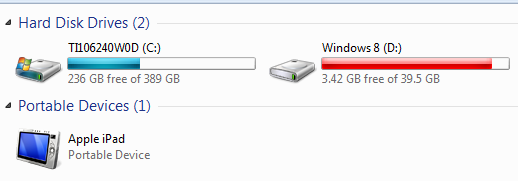
Sometimes you need to transfer photos or albums from your iPad to your Windows PC. You can find a number of Apps on Apple Store to do this. Most of them use some form of connectivity with WiFi being the most popular. Unfortunately you end up spending time reading manuals or troubleshooting information. Here is the easiest way of doing without downloading any APP but using the stuff you already should be having. There is only one step in this procedure: Y ou do not need anything other than what you should be having . Hook your iPad (firmware 7.0.4) connector's USB end to the Windows OS (Windows 7 x64 Ultimate)  computer's USB Drive (assume that the other end is connected to iPad). The Windows computer recognizes the connection and now click Start | Computer and you should be able to see your Apple iPad as shown. If you open the DCIM folder that is displayed when you double click Apple iPad in the above it will be empty. After sometime you get an iPad mess...