Posts

Xiaomi strikes gold in India and humbles Samsung

In order to serve the growing number of Indian users of Xiaomi, a new dedicated data center is planned to be opened in India in 2015. Xiaomi was storing Indian users' data on Servers in China but after receiving warning from Indian Air force they have decided to move out from servers in China. Presently they will be moved to servers in Singapore and later to Indian datacenter when it gets ready. http://www.businessweek.com/news/2014-10-27/xiaomi-moving-indian-user-data-to-servers-outside-china Read my previous post oon Xiaomi here: http://hodentekmobile.blogspot.com/2014/08/xiaomi-from-china-challenges-apple-and.html http://hodentek.blogspot.com/2014/08/xiaomi-smart-phones-are-sell-off-in.html Are they more popular than iPhones? I bet they are. Here is a piece of text quoted here from the previous link: " And you thought iPhones were popular. At 2 p.m. on Oct. 14, Xiaomi put 100,000 of its Redmi 1S smartphones up for sale in India, using local e-commerce site Flipka...
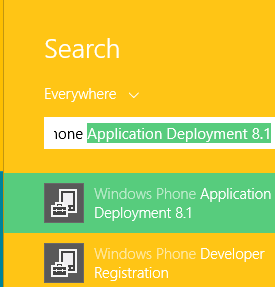
Deploying an app to your Windows Phone 8.1

Image
You may find this helpful if you are developing an application for Windows Phone. You are a Windows Phone 8.1 Preview developer and you have created a nice app that you want to test on a phone you own. How do  you test it? While developing the application using Visual Studio 2013 Express for Windows Update 3 (this is a free developer resource, read more here ) you will see it on a emulator, the phone image that emulates your actual phone  that comes on your PC/Laptop when you run the app. After running the app on your laptop you should deploy it to your phone. The phone you buy is by default locked and you need to unlock it. Details of unlocking the phone are here: Go to this link: http://go.microsoft.com/fwlink?LinkID=317976 This is how I was able to do. I connected my phone (Nokia Icon) to the laptop. On my Windows 8.1 Professional (x64 bit) laptop I searched for Windows Phone and got these results(few shown) I clicked on the Windows Phone Devel...

How do I get health and wellness app to my Windows Phone?

Image
First of all it does not run on all Windows Phones (hereafter they are called Microsoft Lumias). Only the following Lumia phones have the support of Lumia SensorCore which is needed for this feature: Lumia 630 Lumia 635 Lumia 730 Lumia 735 Lumia 830 Lumia 930 Lumia 1520 Lumia Icon running on Windows 8.1 according to http://web.developer.nokia.com/blogs/news/lumia-sensorcore-sdk-1.0-has-graduated-from-beta   However I was able to install it on Lumia Icon running 8.0 as well. You can get it from the Windows Store. Just search for Health and Fitness; download and enjoy. You should see a screen like this when you activate the app. This one is on my Nokia Icon running Windows Phone 8.1 Preview.  

Do you want to build health and fitness apps with Windows Phone?

Image
This is possible if you use the LumiaSensorCore SDK.  What is LumiaSensorCore SDK? Read here: http://hodentekhelp.blogspot.com/2014/10/what-is-lumiasensorcore.html How do start using the SDK? Well you need to bring it to your application. It is not like downloading it as an executable but it is a Visual Studio Extension that you should install. If you have Visual Studio 2013 Express Update 3 http://www.visualstudio.com/en-us/news/2014-aug-4-vs.aspx You should launch VS2013 and from its Tool menu you should access Manager NuGet Packages and download the SDK as shown. You should have NuGet Package manager. If you do not have go here and install it. How? Go here to this link: http://hodentekhelp.blogspot.com/2014/08/how-do-you-install-nuget-package-manager.html   Once you do this you should be able to start working with this.      

Bad news! If you have Nokia Icon from Verizon you are stuck with Windows 8.0

Yes. You are stuck with it as Verizon does not tell (or it does not know) when it can push the Windows Phone 8.1 to your Icon. It was rumored that the 'push' is going to happen at the end of August. Come on, today is September 19. May be you should trade it at a AT&T stall. http://hodentekmobile.blogspot.com/2014/07/windows-phone-81.html Actually, I admit I had a rough conversation going with a Verizon assitant at one of the local stores here. They have one answer, "I don't know when". They were nice and better at anger management. Verizon sells a phone and does not tell when it is going to push the new OS. Nokia and Microsoft seems to have no bearing on this 'push'. Nobody takes the responsibility! Practically you are stranded!

Get CodeShow() and improve your Windows 8 coding skills

Image
The CodeShow() on CodePlex is one source which may help you a great deal in programming for the Windows 8 Platform. You may get a comprehensive picture of an end-to-end app but more importantly CodeShow() gives you an opportunity to learn all the bits and pieces of accessing devices like camera, error handling with grace etc. In order to install CodeShow() there are some options. You can install from Windows Store from here: http://aka.ms/codeshowapp This not some kind of an executable but bundled source code. Another option is to get the source code from here http://codeshow.codeplex.com/ . Once here, you can download a zip file by hitting the marked tab (Download). This will give you a snapshot of the source code as it exists at the time you downloaded. Mark you,  it gets continuously updated and if you are not vigilant you may miss out. This is a zip file and extract everything to your favorite folder. There is yet another option Clone it or Fork it. ...

Intel XDK - Grab the latest September release

Image
After the July 2014 release, the September 2014 SDK was released (Intel XDK - Release - 2014 September 08 v1332) recently. Plugins and Services integration especially for games development with HTML5 was the high point of the July release. Read previous posts if you have missed: Details of July release here: http://hodentek.blogspot.com/2014/08/jump-start-your-cross-platform-app.html Types of project you can create with Intel XDK here: http://hodentek.blogspot.com/2014/08/project-options-for-cross-platform-apps.html Creating a ListView type of cross-platform app with Intel XDK here: http://hodentek.blogspot.com/2014/09/creating-listview-type-of-cross.html Step-by-step procedure to create a ListView cross-platform app with a template here: http://hodentekmobile.blogspot.com/2014/09/creating-projects-with-intel-xdk.html New features in the September release are: Improvements to Live Development    Live Development in Develop tab has been changed...