Posts

Markdown Syntax makes web page more readable, editable

Image
HTML markup is well known and Markdown Syntax is a construct to make a web page readable.  Markdown syntax is used to make it possible to write to the web using simple text.  It is a text-to-HTML tool for web authors. No need to type those angle brackets(< and >). Markdown syntax is very small and not extensive like that of HTML. It is not used to replace HTML but to make it easy to read/write/edit prose in a web page. Markdown does not need special editors. Since Markdown consists of few constructs if you need beyond them you can use HTML. One of the special constraints in using Markdown is in the case of block level elements such as 'table', 'pre', 'p' etc. In this case for using Markdown just surround block-level elements with blank lines and Markdown syntax takes care of the rest. Learn more about Markdown syntax here . While you are there click on the tab Dingus tool (written in Perl) to convert your Markdown Syntax to html syntax. ...
The
pre
tags continues to not work in Blogger

Image
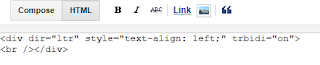
For quite sometime I have had problem displaying HTML code in my blog as the Pre tag did not render correctly. Here I am trying to see what is happening, if any, in rendering the Pre tag. I decided to show only screen shots of either the HTML tab in my blog post, or the Compose tabbed page of my blog so that the browser effects are properly seen. When you want to create a new post in Blogger, this is the HTML code you get and the 'Compose' page is empty. Pre_00 Now I enter a single line-' This is a test ' in the Compose tabbed page. Pre_01 The HTML markup shows this: Pre_02 Now I add a ' Pre ' tag as shown. Pre_03 The following is the content of the ' Compose ' page. Pre_04 So far no problem, good. I now go back to HTML pane. Looks OK, but it has added another repeating line at the top. Pre_05 Not a big difference. I refresh the browser and everything back to as it was before refresh. I just draw a line in...

Publishing Mobile Reports using SQL Server Mobile Report Publisher

SQL Server Mobile Report Publisher (SSMRP) is an authoring tool that can be used to quickly creating Reporting Services mobile reports that are optimized for mobile device with a variety of form factors. You can have an assortment of visualizations, from time, category, charts, tree maps, and custom maps. With SSMRP you can, Connect mobile reports to a range of data sources including on-premises SQL Server and Analysis Services Layout reports on a design surface to accommodate flexible mobile reports Save mobile reports to a Reporting Services server and interact with them in a browser or with Power BI on mobile devices(iPad, Android Phones and tablets and Windows 10 devices). What do you need to create Reporting Services mobile reports? You need the SQL Server Mobile Report Publisher Version: 1.0.3923 File Name: SSRS.MobileReportPublisher.Installer.msi Date Published: 9/22/2016 File Size: 25.3 MB System requirements: Supported Operating System Wind...

Apps with Mobile Roadie, the one-stop platform

Image
MobileRoadie is the platform to build mobile apps with rich features. It is also one-stop, build, manage, design and engage. It supports all media, photos, video and audio. The text color in the picture may not show you the logo clearly! Here are features taken from Mobile Roadie site . Using Photos: Upload your photos manually, or automatically pull in your photos from an RSS feed, Flickr account, Instagram account or hashtag, Mobypicture, Picasa, Twitpic, or Facebook Fan Page profile photos. Users will see your photos in a grid layout of your choosing, and can even play a slideshow of your photos. Embed news: Add news posts manually, or import automatically via RSS feed, Twitter account, or Google News keywords.     Each item has artwork, title, date & time, and HTML story content. FAN Wall:     Import your past and upcoming events from Artistdata, Bandsintown, Songkick, Plancast, Ticketmob, SonicLiving, Eventbrite, or ad...

Now we have Samsung Galaxy S8 and S8+

Image
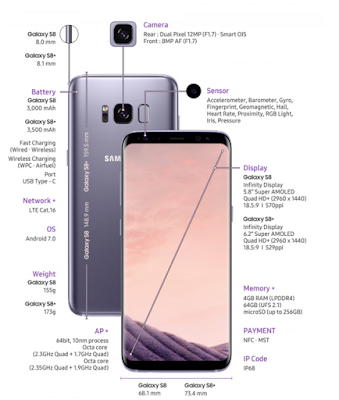
They are black, they are beautiful and they have OLED screen. There is yet another voice assistant BIXBY to join the Cortana, Alex and others. The future looks like the battle of the voice assistants. While S8 is 5.8", the S8+ is 6.2" with an aspect ratio of 18.5/9. probably the battery (3000 Ah & 3500 Ah) must have had an extra overhaul. The battery can be charged using the USB-C charging port. It has nice resolution 2960x1440 with the display covering 83% of the face. There is no HOME button but there is a pressure sensitive area that functions as one.The cameras remain the same as in its earlier phones. It appears that it has been designed to work with the up and coming Internet Of Things like the Connect Home feature.The OS is android. The phones ship sometime next month. Here are the specs (look after zooming) as seen on the SAMSUNG News Room site.

Is Microsoft Band 2 dead?

I thought it was a nice fitness device, not as flashy as Apple Watch. I was even preparing to buy one. The only place where I could by was at amazon.com. It is not available in Microsoft Stores. I believe Microsoft has pulled it out of the stores. Even the developers SDK is not available anymore. Cutting of the limbs like this can only mean one thing. Microsoft Band 2 is dead. I have to look at other options. There seems to be too many with a staggering price range. Well what about Samsung's band? I will look into it. It will not come cheap.

Creating a database in SAP's Ultralite 17 - Part 2

Image
Mobile apps without data are not very interesting especially for enterprise / business applications. Most  businesses are data-centric. Ultralite databases with their small foot print are ideal for mobile applications. As described in the previous post you can use the APIs to create apps on many different devices. In this post I describe the steps to create a database with all the default settings using the SQL Central interface. If you are new to SQL Central (was previously called Sybase Central) you may want to read my older posts here . Launch S QL Central from All Programs under SQL Anywhere 17. Click Tools and choose under UltraLite to create a database as shown. Create_00.png  Creating a database is driven by the Wizard which appears as soon as you click Create Database... in the above window. The following sequence of windows shows how the database is created. Although you can make many changes to the database settings, all defaults are used in this post. ...