Posts

Creating a Label widget using Python and Kivy - Part 1

Image
  I assume you've read my previous post, " Is Python a language for creating GUIs ?" If so, I invite you to create a label using Python and Kivy. In my previous post, I demonstrated  how to install Kivy in the PyCharm IDE , and we shall start from there. However, it is not necessary to use  PyCharm  to create a label; it can also be done using the command line if you have  Kivy  and  Python  installed on your computer. PyCharm is particularly useful if you plan to create multiple projects and more involved programs. Why a Label? GUIs comprise many kinds of widgets, and perhaps the label is one of the most common and obvious elements. Labels can be seen individually or as part of larger widgets with smaller sub-widgets, such as in a form or an authentication GUI. In its most basic form, a label is a small object that usually carries a piece of text, such as 'Welcome' or 'Hello World.' It may even carry a small image. How do you create a label using...

Python and Kivy duo a great combination for mobile apps

Image
    The introduction of Computer applications with a graphic user interface was significant milestone in moving Computers and their utility from specialists and technologists to the general public. This was significantly impacted by the 'Desktop' revolution that shifted requirements from Main Frame to Tabletop devices. This also shifted the computer applications from procedural languages to more 'Object' based or object oriented languages and ushered the Internet revolution and presently enjoys enormous popularity because of their utility in every aspect of life. GUIs simplified interactions with computers, making them more intuitive and user-friendly and led to the democratization of computer access. GUIs in Internet based applications propelled their utility in World Wide Web, e-commerce, social media and online communications and learning. In the early days, GUIs were exclusively built using low-level languages such as C and C++. With the introduction of higher-level...

You need KIVY to develop multi-touch mobile applications. Do you know how to install this made for mobile library?

Image
    There are many platforms for writing Apps for mobile phones and KIVY is a open-source Python library. It can be used for developing multitouch apps on mobile devices. It's strength is once created it can run on various platforms including Windows, macOS, Linux, Android and iOS.  Key Features of Kivy: Cross-Platform: Kivy allows you to write your code once and run it on multiple platforms without modification. This is incredibly useful for developers who want to reach a broad audience. Multitouch Support: Kivy is designed with multitouch in mind, making it ideal for applications that require touch input, such as mobile apps and interactive kiosks. Customizable Widgets: Kivy provides a wide range of customizable widgets, allowing developers to create unique and visually appealing user interfaces. Note: It has no Radio Button. GPU Acceleration: Kivy uses OpenGL to provide GPU-accelerated graphics, ensuring smooth and responsive user interfaces. Community and Documentatio...

Follow these steps to install Android Studio Koalas and develop Android Apps

Image
 The latest version of Android Studio is called Koalas(2024.1.1) Please visit this site for details: https://bit.ly/4eAwThe For Windows download go here: https://bit.ly/3VToH4h I had problems installing an older version named Arctic Fox here; https://hodentekmobile.blogspot.com/2021/09/installing-android-studio-arctic-fox.html#google_vignette Instructions: If you downloaded an .exe file (recommended), double-click to launch it. If you downloaded a .zip file: Unpack the .zip. Copy the android-studio folder into your Program Files folder. Open the android-studio > bin folder. Launch studio64.exe (for 64-bit machines) or studio.exe (for 32-bit machines). Follow the Setup Wizard in Android Studio and install any recommended SDK packages. Herein I describe the installation of Android Studio Koalas on a Windows x64 laptop Surface Pro 5. I downloaded this file:  android-studio-2024.1.1.11-windows.exe The installation screens are shown here: Although all the screens have successful...

Koalas is the latest version of Android Studio to do everything with your Android apps.

Image
   I have been away for quite some time. Firstly, when Microsoft gave up on Windows Phone and the demise of the Windows Phone OS, then later I myself faced some health issues which I managed to overcome. I am picking and hope to post something useful once in a while. The latest version of Android Studio (2024.1.1) is called  Koalas . Android Studio is used for building high-quality, modern Android Applications. The following features make it extremely well suited for building modern Android applications. These are in no way new but essential in all modern design environments:  Develop Native Android Apps:  The basic function is used to build Android applications using  KOTLIN , or Java. KOTLIN is Google's preferred language for Android app development. It provides an development environment with all the necessary tools for writing, editing, testing, debugging, and deploying your application. It's Android device monitor can explore various aspects of a conne...

Android Mobile Simulator for Microsoft Edge

Image
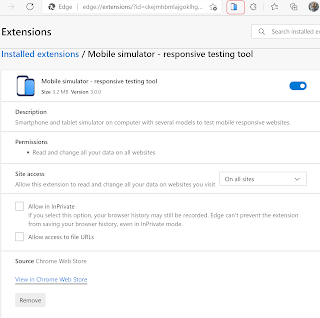
  You have built a web application on your PC or laptop.  Now,  you want to see how it appears on a mobile device. This is the use case for a mobile simulator, an extension that displays how your site would appear on a handheld. It is a responsive testing tool. It is available on Google Chrome Webstore. It can simulate 5 models of Android smartphones and 11 models of Apple smartphones. Deatils here:  Mobile Simulator From the above site you can add it to Microsoft Edge where it will show as one of the extensions as shown. How do you test it? Just bring up a web page (any) as shown here: Now click on this icon and see the simulator getting displayed as shown: There is another web site here with some operational buttons on the right.

Where do I find the app's .apk file in Android Studio's latest version?

Image
  The Android Studio has been changing ( https://android-studio.en.uptodown.com/windows/versions ).  The version  I am using is the latest. The location of the APK file is found in the ' output ' folder. In the Snow Cat version of the Android Studio, the location of the APK (app-debug.apk) file is shown in this figure. I copied the file and I installed it on a Android Phone where .apk files can be installed.

How do you fix this error net::ERR_CACHE_MISS in an Android app built using Android Studio?

Image
 I am a Windows Phone developer trying to get into Android App development. I have been working with Android app development for the past couple of days with the latest Android Studio.  I finally got an app that can display an URL . I had an important line missing in my Manifest file and when I corrected this it worked. It has to do with the browser permissions. ========= <?xml version="1.0" encoding="utf-8"?> <manifest xmlns:android="http://schemas.android.com/apk/res/android"     package="com.example.mywview"> <uses-permission android:name="android.permission.INTERNET"/>     <application         android:allowBackup="true"         android:icon="@mipmap/ic_launcher"         android:label="@string/app_name"         android:roundIcon="@mipmap/ic_launcher_round"         android:supportsRtl="true"         android:theme="@s...

Installing Android Studio Arctic Fox

Image
  Android apps are becoming very popular. How do you build one on a Windows 10 computer/laptop? I am used to developing Windows Mobile (Microsoft gave up on this) using Visual Studio of various versions, but I wanted to try an Android app. It is easy to get a link ( Download Android Studio and SDK tools  |  Android Developers ) to the download page for the latest version of Windows (x64).  The problem was, after downloading the executable and running it was hampered by the Ransomeware protection of Windows 10. I finally resolved it, as shown  here . Here are some screenshots of the install process: Hello, Arctic Fox, be good to me! Setting up the development environment Android studio setup is driven by a wizard and is very easy. Just follow the screenshots. It shows the variety of devices you can develop the apps. Just click next or finish as the case may be. Android starts other components needed for development as shown. Well, there was a hiccup here. I think...

Problem and Resolution: Installing Android Studio on Windows 10 (x64)

Image
  You can download the Android Studio for Windows and other platforms. However, trying to install in Windows 10 you may run into a problem.  At the end of the installation, you get the error that the software was not installed because the temp directory could not be accessed.  This is quite a frequent, error many folks are confronted with while installing some new software.  I encountered this problem trying to install Android Studio on my Windows 10 (x64). What is Windows 10 controlled folder access? Controlled folder access is an anti-ransomware feature in Windows 10 that helps protect your file system on your computer from modification by suspicious or malicious apps (especially ransomware). You should find this in "System Protection" Controlled folder access in Windows Security reviews the apps that can make changes to files in protected folders and blocks unauthorized or unsafe apps from accessing or changing files in those folders. Access the relevant feature p...

You may want to develop games for SKILLZ

Image
  Beginning today Skillz started trading. Skillz is the leading mobile platform for gamers. It combines mobile gaming with sports that enables everyone to share in the sports competition. The mobile gaming market is expected to grow by 2025 to $150 billion according to Skillz site ( https://www.skillz.com/skillz-becomes-first-publicly-traded-mobile-esports-platform/ ) If you are a game developer (iOS , Android, Cardova, Unity) you may be interested in the following information,

Happy New Year 2019 to you all

Image
Wishing you all a Happy New Year 2019. Thank you for reading my blog. See you in 2019

Get going with Ractive.JS for your web pages

Image
Ractive.JS consists of a UI library that works with templates. Ractive JS library transforms style, logic to highly interactive apps. It has out of the box support for, Powerful and extensible components, two-way binding, scoped CSS, SVG support and animations. There are also plugins if the above are not sufficient. It does not have a very steep learning curve like other frameworks. It's origins are in the News media company, the Guardian . Originally used for producing News related applications where the demands and interactivity are very high. Nice thing is,  you are not locked to it like other frameworks. Here is the script reference to Ractive.JS If you want to download there are many references: # jsDelivr https://cdn.jsdelivr.net/npm/ractive # CDNjs https://cdnjs.com/libraries/ractive # unpkg https://unpkg.com/ractive # npm npm install --save-dev ractive # Bower bower install --save ractive Just go to the cdnjs.com above and click. When y...

UWP : Visual Studio 2017 Community error 'App Didn't Start'

Image
This error appears when you try to deploy the project to the Local Machine (x64). There are no errors during build or deploy stages. However, when you try to run the machine you come up with this message after the App shows up momentarily and disappears immediately. Trying to deploy to an emulator such as Mobile Emulator 10.0.14393.0 WVGA 4 Inch 512MB comes with the following errors. The emulator is running: However when you deploy it to a device (in this case Lumia 925) the app gets deployed with no errors. In order to proceed to package it for uploading to the Windows Store I am not sure just deploying it to the device is good enough. Is there a fix?

UWP: Choosing the right target version for UWP Projects

Image
I faced quite a bit of downtime due to the wrong choice of the target version working with UWP Projects. Web search to find a cure sent me searching for answers I could not find. I am using Microsoft Visual Studio Community 2017 Version 15.8.1. The Dell alptop is running Evaluation copy of Build 17733.rs5_release(18083-1525). [ This OS has a problem in that when you shutdown and restart the OS, it will reinstall the OS afresh wiping out some of the folders; saved passwords; saved items in Microsoft Edge. Visual Studio also gets reset. ]. Now coming back to the right Target version for working with UWP projects, there are three options for the Target version shown in this image. RightTargetVersion_0 Of the three options only one of them allows the Desgin editor in Visual Studio come up without this error - The app did'nt start(HRESULT:0x8027025B) . This is the only one that works: Windows 10 Creators Update (10.0; Build 15063) . Regarding the choices for...