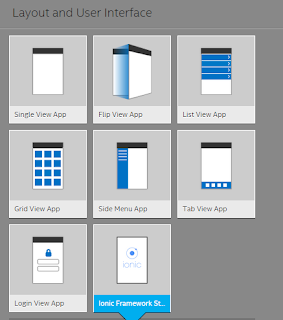
Using templates is the easiest to start off designing apps with Intel XDK. Intel XDK provides a number of layouts and templates for designing apps. Layout_UI.png If you have been using apps you must have come across apps that use many of these types of apps. For example an earlier post here discusses the List View Template in detail and this link describes the Tab View in detail(). We will explore the other templates in future posts. The Ionic Framework Starter template uses the Ionic Frame work and AngularJS and you can design apps for desktop, smartphones and tablets using Standard HTML5. Ionic Framework is supposed to provide native-app like feeling for UI and is based on HTML5 and essentially a front end beautifier. However Ionic requires AngularJS which is required for UI interaction; gestures; animations etc. ionicFramework.png In a future post we will describe creating an app with Ionic Framework. Read more here for Ionic Framework: ionicframewo...
In my previous post, I described some details of the Appery.io platform for developing hybrid and web apps. In this post, I show details of creating a mobile app and viewing it on iPhone 6S. The details are also available on the Appery.io site but here in you will get to see the step by step screen shots. If you have followed my posts on Intel XDK ( http://hodentekmobile.blogspot.com/search?q=intel+xdk ) , you will have no trouble in following this post. With Intel XDK not supporting some of the editing features Appery.io editor seems to fill in the void. I will explore it a little further to see how far this is taken. First come first. You need to first sign up here: https://appery.io/account/signup Go to your email and confirm your account. Once you have the account you can build. Go here to get to the developer platform: https://appery.io/app/projects Click on Apps. I have found the server to be very slow and you may have to wait a considerable time. You may...
I assume you've read my previous post, " Is Python a language for creating GUIs ?" If so, I invite you to create a label using Python and Kivy. In my previous post, I demonstrated how to install Kivy in the PyCharm IDE , and we shall start from there. However, it is not necessary to use PyCharm to create a label; it can also be done using the command line if you have Kivy and Python installed on your computer. PyCharm is particularly useful if you plan to create multiple projects and more involved programs. Why a Label? GUIs comprise many kinds of widgets, and perhaps the label is one of the most common and obvious elements. Labels can be seen individually or as part of larger widgets with smaller sub-widgets, such as in a form or an authentication GUI. In its most basic form, a label is a small object that usually carries a piece of text, such as 'Welcome' or 'Hello World.' It may even carry a small image. How do you create a label using...




Comments