Posts

Showing posts with the label Intel XDK

Apache CORDOVA is the place to go if you were using Intel XDK
Image
I was following Intel XDK for more than a year   with many posts on my blog for mobile devices and participating in Intel's forums.  I have observed that its emphasis was slowly changing and I started looking for alternatives. There are programs for which you need to pay, which I am not ready, as I do not derive any revenue from what I do. I am looking for free programs. Progressively Intel XDK has been shifting their focus to mostly Intel IoT devices. The App Designer support does not exist anymore except for a few features in the interface. The Interface as you knew it is now mostly geared for IoT devices. Intel XDK forum suggests that there are more tools freely available (on the Internet) that may do equally well and a strong recommendation for using Cordova CLI. Well one cannot expect a tool to live eternally and things do change. What is needed on the part of developers\users is to turn somewhat nomadic and look for new pastures. Here is a link to Apache CORDOVA ...

Intel IoT and IoT Gateways

Image
Intel XDK is changing its emphasis focusing more on IoT . Going forward many may want to experiment with Intel XDK for IoT. Here is a brief summary of one of the key elements in doing IoT, the IoT Gateway. IoT Gateways connect IoT Devices or 'Things' to some kind of computing platform or to the cloud to provide intelligence for the IoT Solution. Although it is possible to directly connect the device to cloud if some form of intelligence to be derived before going to the cloud, a Gateway is a better solution. If devices are TCP/IP enabled as in modern devices connecting them to the cloud is easy but there are legacy devices which are not TCP/IP enabled and therefore they need an intermediary device to connect to the cloud. These are some of the reasons that requires an intermediary Gateway: Support for legacy devices   Run edge analytics- Reduces communication bottleneck by pre-processing (batching, filtering, compressing etc)   Minimize Latency- processing near edg...

Changing emphasis of Intel XDK

Image
If you have been using Intel XDK to build apps both HTML5 based and native apps, there is going to be (actually has been going on) a change in the direction. A number of frameworks were used with Intel XDK in the designer. You might have noticed that the number of frameworks are being deprecated. Presently, in version (the latest) 3641 only the Twitter Bootstrap is currently supported and the others are being deprecated. Intel XDK is going to focus more on IoT apps. The other apps are not going to be supported in the Intel XDK. Since most of the technologies used in developing non-IoT apps are mature, Intel XDK will get provide documentation help to use these technologies. This is according to Paul, one of the Intel XDK moderators: " it's not that there is a benefit for developing IoT apps over mobile apps, they are quite different apps; the point is that we are focusing the tool to emphasize IoT app development, especially since the free and open-source tools available for ...

Are you building apps with Intel XDK?

Then you may note the following: The latest update released October 11, 2016 is v3619 If you are using versions prioer to 2893 released in March 2016 then the following are no longer supported:           Build Tab          Test Tab          and the Intel App Preview Please upgrade to version 3619. After this the Debug tab and the hosted weinre server while using Test Tab and the Live Development pane under DEVELOP Tab are deprecated and will be retired soon. What's new in v 3619? A keyword-based filter for sorting samples and prjects New Linux and Apple OSX installers New Iot Project Samples using Microsoft Azure Many other issues have been addressed. Too numerous to sumarize here. Follow this link: https://software.intel.com/en-us/xdk/docs/release-notes-information-intel-xdk

Intel XDK: Controls 13: ACCORDION Control in App Designer 7

Image
In this post I will be considering the most basic implementation of the ACCORDION control in an Intel XDK App Framework 7 project. I had described the accordion control  years ago while using the DOJO framework, another framework that worked splendidly. You can create a project with an ACCORDION control on the web page. You launch Intel XDK (Version3522) and create a Standard HTML5 project and choose to use the App Framework 7. This creates a single page application and the DESIGN features will be available. I just placed a HEADER and replaced its title to My Books. The ACCORDION control is available under CONTROLS as shown. Accordion_00 For this post I tried dragging and dropping this control on to the page and it does not work, probably by design. What you need to do is to drop the following HTML fragment for this control on the page. Accordion_01 This is where you would place this code: Accordion_02 This will generate an accordion control ...

Intel XDK: Controls 12: SORTABLE LIST BLOCK widget in App Designer 7

Image
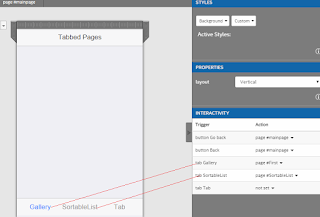
I am using the same project I described earlier, the TabbarWidget which has three tabs in the bottom of the page as shown. I created two more pages, named First and SortableList. I renamed the tabs as shown in the image of the main page image of TabbarWidget. SortList_00 Using the INTERACTIVITY, the tabs Gallery and SortableList will open the First and SortableList pages. The Back and Go back buttons on those pages will bring the Main page to the display. The Gallery tab brings up the FIRST page as shown. This page is configured as described earlier to demonstrate the basic IMAGE GALLERY widget in Intel XDK. SortList_01 The SortableList tab brings up a page in which I have placed a SORTABLE LIST BLOCK widget from CONTROLS | LIST BLOCK shown here. SortList_03 When you place the SORTABLE LIST BLOCK widget the following HTML will be added to the index.html as shown. SortList_04 The SortableList tab on Main Page when clicked takes you to this pa...

Using Galleria code in Intel XDK

Image
In my previous post I described using galleria in a web page on my local IIS . The displayed page appears as shown. Galleria_Intel_00.jpg In this post I describe how you may implement the same code in Intel XDK. Prepare yourself with the images you want to use as well as the following files from your galleria download: galleria-1.4.7.js galleria.classic.css galleria.classic.js Create an Intel XDK Project using Standard HTML5 using App Designer (we will not be using the app designer controls). The project may not have separate folders for CSS and Images . Create these folders (CSS and Images) in the www folder of your project. Copy the images to the Images folder and the above CSS file (galleria.classic.css) file to the CSS folder. The www/js folder of the app will have only app.js and init-app.js files. Copy the two files ( galleria-1-4-7.js and galleria.classic.js ) to the www/js folder. The main files in my project (GalleriaSimplis2) are as shown here: ...

Intel XDK ImageGallery widget uses galleria.js

Image
If you did enjoy the previous post on using the ImageGallery widget in Intel XDK you must have realized that it uses the script file from Galleria (galleria.io). If you want to build apps based on Galleria you have to download Galleria , presently in version 1.4.7 from Galleria site ( galleria.io ). It is always better if you can get away from widgets as they may not have a definite support time line. At sometime the developer of the widget may move on to other interests or may not be supported. Galleria appears to be very popular if you go by it's 2.5 million downloads so far. The Galleria version 1.4.7 will have all of these in the free download (under MIT license). The basic version is free. You get more if you can spend some money in the premium version. If you are interested go the Galleria site. In the download you find this file: galleria-1.4.5.js Which you should reference in your web page, if you want to build pages with galleria. Th...

Intel XDK: Controls 11: Customizing IMAGE GALLERY Widget in App Designer 7

Image
In this post we will add more images to the slide show in the IMAGE GALLERY widget in App Designer 7 of Intel XDK. We basically use the same documents we used earlier in the previous post here ( http://hodentekmobile.blogspot.com/2016/09/intel-xdk-controls-10-image-gallery.html ). The design of the FIRST page in the TabbarWidget page has not changed. Cntrl11_00.PNG What gets changed are the extra images added to the gallery_images folder and the changes to the gallery-images.json page which points to these added images. Make sure the images added are 640x480. It is very easy to locate the folder to place your images. Just right click gallery_images as shown and click Show in Explorer . Cntrl11_01.PNG I added four more images, BavarianAlps.png, PragueAerial.png, Vienna.png and Salzburg.png to the gallery_images folder. Right click www under projects and click Refresh File Tree .Expand gallery_images and verify the images are there. Cntrl11_02.PNG Now modify...

IndexedDB support in Intel XDK

Image
After describing options for database integration for mobile apps, this post describes a test that you can use to see if your browser supports IndexedDB. Database for Mobile Apps: When it comes to integrating mobile apps with databases there are two popular options, SQLite database or IndexedDB Database. While the former is a relational database, the latter is not-it is a storage for key/value pairs. This post here (http://hodentekmsss.blogspot.com/2016/09/sqlite-using-visual-studio-community.html) describes some details about SQLite database and the process of installing it on your computer. According to Mozilla Developer Network, " IndexedDB is a Web API for storing large data structures within browsers and indexing them for high-performance searching. Like an SQL-based RDBMS, IndexedDB is a transactional database system. However, it uses JavaScript objects rather than fixed columns tables to store data ." Complete details of this API are here ( https://developer...

Intel XDK: Controls 10: IMAGE GALLERY Widget in App Designer 7

Image
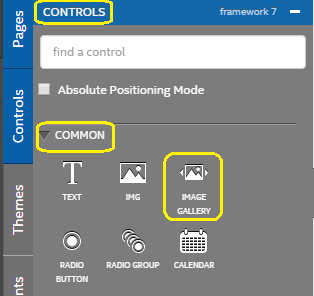
This post is about Image Gallery control in Intel XDK's App Designer 7. The Intel XDK Version in 3522. This is Window 10 Lap top. The IMAGE GALLERY control can be found in the COMMON category under CONTROLS as shown. IG_00 Drag and drop the control on a page. I have placed it on a page with the header text 'First' which I can access from a TABBAR on the main page. The 'First' page with IMAGE GALLERY widget dropped on it appears as shown. Note that the height was changed from its default: 250px IG_01 The HTML fragment for this control is as shown. IG_02 The ' gallery_images/gallery_images.json ' has a json file with the three images in this basic app. --------- [   {     "image": "gallery_images/freightliner.jpg"   },   {     "image": "gallery_images/sailing-ships.jpg"   },   {     "image": "gallery_images/taxi-cab.jpg"   } ] The image files are in the same node,...